Solutions/AI Governance
Govern your AI agents like you govern your data.
dScribe puts every AI agent and model in your catalog, checks every call with guardrails and keeps spend inside a budget you set. It also adds your context layer to every question automatically.
Agents are popping up in every team, and nobody sees what goes in, what comes out or what it costs.
AI agent
Sales Analyst
Spend this month
€312
dScribe · one call, checked
“ARR for account BE68 5390...?”
- Personal data
- MaskedIBAN
- Injection
- Clear
- Context
- + 4 catalog assets
- Cost
- €0.014 · 3,912 tokens
The problem
AI is moving faster than anyone can govern it.
Visibility · IT's question
“Which agents are we running, on which models, and who owns them?”
The CIO, after the third team ships “a small bot”
Cost · Finance's question
“Our model bill tripled, and nobody can say which agent did it.”
The monthly cloud invoice
Trust · The board's question
“The agent leaked an IBAN and used a revenue definition nobody approved.”
Privacy and governance risk
What dScribe does
One place to register, guard, budget and ground every agent.
Register01
Know what runs
Every agent and model is a catalog asset, with an owner and a list of who may use it.
Guardrails02
Check every call
Personal data and prompt injection caught in prompts, tool results and answers.
Cost03
Cap the spend
Every call priced at the real provider price, inside a budget per agent.
Context layer04
Ground every answer
Approved definitions, datasets and reports added to the prompt, automatically.
Guardrails
Guardrails on every call, tuned to every agent.
Admins set each guardrail per agent: off, flag, mask or block. They work the same for agents built in dScribe and for agents built elsewhere that call their model through the dScribe gateway.
| Checks | Where | Example setting |
|---|---|---|
| Personal data inE-mail, phone, IBAN, card and national register numbers, verified by checksum. | Prompts | OffFlagMaskBlock |
| Personal data outThe same checks on what the model answers, before anyone sees it. | Answers | OffFlagMaskBlock |
| Prompt injection“Ignore your instructions” and other attempts to take over the agent. | Prompts | OffFlagMaskBlock |
| Poisoned contentInstructions hidden in a document, ticket or web page a tool brings back. | Tool results | OffFlagMaskBlock |
Cost monitoring
See what every agent costs, and stop it before it overspends.
Every call is priced at the list price of the exact model and region that served it, minus your contract discount. See spend per agent, model, user or API key, and give each agent a monthly budget dScribe enforces.
How a monthly budget on an agent works
- 80%Owners alertedBy e-mail and in the app, once per thresholdAlert
- 100%Fallback modelCalls move to the cheaper model you pickedSwitch
- 120%Calls refusedOr at 100% when there is no fallback modelStop
Context layer
Your context layer, injected automatically.
Switch it on for an agent and, for every question, dScribe adds the matching definitions, datasets and reports to the prompt. It searches as the person asking, so the agent only sees what they may see.
- Question from a user or app“What was ARR in Q3?”
- dScribe context layer · added to the prompt, no code neededARR · definition FCT_REVENUE Revenue report
- Grounded answerUses the approved ARR definition, and says so.
In the product
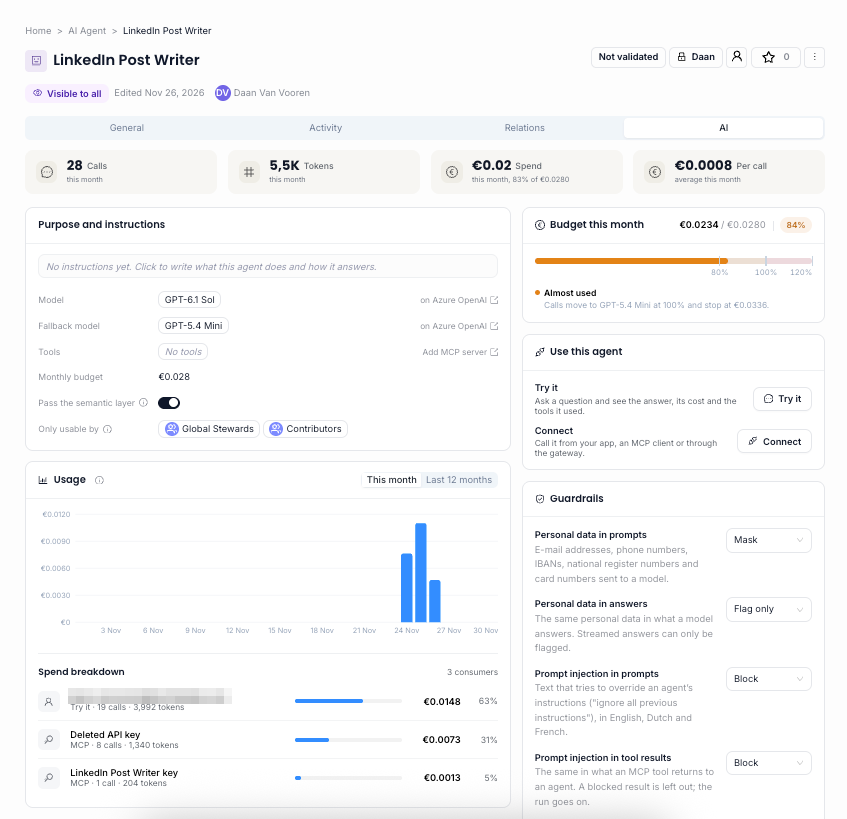
Every agent's cost, budget, guardrails and context on one tab.
Each agent gets an AI tab in the catalog. Try it there, or call it from your app, an MCP client or through the gateway.
- 1Spend this month. Calls, tokens, cost and cost per call.
- 2Budget. Alert at 80%, fallback model at 100%, stop at 120%.
- 3Context layer. One switch adds your catalog to every prompt.
- 4Guardrails. Set per agent: off, flag, mask or block.
- 5Spend breakdown. Per user and API key, per day or month.
Built for security reviews
- Prompts and answers are never stored.
- Runs on your own Azure OpenAI, with keys encrypted.
- ISO 27001 certified. Security at dScribe
Coming next
Golden sets and a full audit trail
Golden sets to test agents before every change, and a full audit trail with evidence for the EU AI Act and ISO/IEC 42001.
See your agents on one tab.
Book a call with the team and we'll walk you through guardrails, budgets and the context layer on your own use case.
Lets grab a coffee ☕